Integrating your security system with smart home devices can significantly enhance the convenience, control, and overall security of your property. By connecting your security cameras, alarms, and sensors to smart devices like lights, thermostats, and voice assistants, you can create a seamless, automated experience that keeps your home or business safe. In this guide, we’ll walk you through the steps to successfully integrate your security system with other smart devices, ensuring you get the most out of your smart home ecosystem.
Step 1: Choose Compatible Smart Devices
The first step in integrating your security system with smart home devices is to ensure compatibility. Not all security systems and smart devices work together, so it’s essential to choose devices that are compatible with your existing setup.
- Check Manufacturer Compatibility: Start by checking if your security system is compatible with popular smart home platforms like Google Home, Amazon Alexa, or Apple HomeKit. Most manufacturers provide a list of compatible devices and platforms on their websites.
- Smart Hub Integration: If your security system isn’t natively compatible with your desired smart devices, consider using a smart hub. A smart hub acts as a central controller that can link various devices, even if they don’t naturally communicate with each other. Examples include Samsung SmartThings and Hubitat Elevation.
- Wireless Protocols: Ensure that the devices you choose support the same wireless protocols, such as Wi-Fi, Zigbee, or Z-Wave. This compatibility allows for smooth communication between your security system and smart devices.
Step 2: Install and Configure Your Security System
Before integrating additional smart devices, make sure your security system is fully installed and configured. This includes setting up cameras, sensors, alarms, and the control panel.
- Follow Installation Instructions: Carefully follow the manufacturer’s installation guidelines to ensure your security system is set up correctly. If you’re not comfortable with DIY installation, consider hiring a professional to handle the setup.
- Configure Settings: Once installed, configure your system’s settings, including camera angles, motion detection sensitivity, and alarm triggers. Ensure that all components are functioning correctly before proceeding with the integration.
Step 3: Connect Your Security System to Your Smart Home Platform
Once your security system is up and running, the next step is to connect it to your smart home platform. This process will vary depending on the platform and the devices you’re using.
- Google Home: If you’re using Google Home, open the Google Home app on your smartphone. Tap the "+" icon to add a device, select "Set up device," and choose "Works with Google." Search for your security system’s brand and follow the prompts to link your account.
- Amazon Alexa: For Amazon Alexa, open the Alexa app and tap "Devices" at the bottom of the screen. Tap the "+" icon, select "Add Device," and choose "Security System." Search for your system’s brand and follow the instructions to link your account.
- Apple HomeKit: If you’re using Apple HomeKit, open the Home app on your iPhone or iPad. Tap the "+" icon, select "Add Accessory," and follow the instructions to scan the HomeKit setup code provided by your security system manufacturer.
Step 4: Add Smart Devices to Your System
With your security system connected to your smart home platform, you can now start adding additional smart devices to create an integrated ecosystem.
- Smart Lights: Add smart lights to your setup and create automation routines where lights turn on when motion is detected by your security cameras or sensors. This not only deters intruders but also enhances your convenience.
- Smart Locks: Integrate smart locks with your security system to automatically lock doors when you arm the system or unlock them when you disarm it. You can also control the locks remotely via your smart home app.
- Thermostats: Connect smart thermostats to your security system to adjust the temperature based on your security status. For example, set your thermostat to energy-saving mode when you arm your system and leave the house.
- Voice Assistants: Enable voice control for your security system by integrating it with voice assistants like Alexa or Google Assistant. You can arm or disarm your system, view camera feeds, and control other smart devices with simple voice commands.
Step 5: Create Automation Routines
Automation routines allow you to control multiple devices simultaneously based on specific triggers or schedules. Here’s how to set up some common automation routines:
- Away Mode: Create an "Away Mode" routine that arms your security system, locks all doors, turns off lights, and adjusts the thermostat when you leave the house.
- Night Mode: Set up a "Night Mode" routine that arms your system’s perimeter sensors, turns on outdoor security lights, and adjusts the thermostat for sleeping when you say goodnight to your voice assistant.
- Custom Alerts: Program custom alerts that notify you if certain conditions are met, such as a door being unlocked while the security system is armed or if a camera detects motion after hours.
Step 6: Test and Optimize Your System
Once you’ve integrated your security system with your smart home devices, it’s important to thoroughly test everything to ensure it’s working as expected.
- Run System Tests: Arm and disarm your system, trigger motion sensors, and check camera feeds to ensure all devices are functioning correctly and communicating with each other.
- Adjust Settings: If something isn’t working as expected, revisit your device settings and automation routines to make necessary adjustments. Ensure that notifications and alerts are configured properly to keep you informed of any security events.
- Regular Maintenance: Schedule regular maintenance checks to update software, replace batteries, and ensure all devices are in optimal working condition.
Conclusion: Enhance Your Security with Smart Home Integration
Integrating your security system with smart home devices offers unparalleled convenience and control over your property’s safety. By following these steps, you can create a seamless, automated system that not only enhances security but also adds comfort and efficiency to your daily life. Whether you’re controlling your system with voice commands, automating routines, or remotely monitoring your home, smart home integration brings your security to the next level.
About Guardyx
Guardyx is your trusted provider of smart home security and automation solutions in the San Francisco Bay Area and Silicon Valley. Whether you need CCTV installation, comprehensive security systems for your home or business, or smart home integration, we offer tailored services to meet your unique needs. Our expert team ensures that your property—whether residential or commercial—is protected with the latest technology, providing peace of mind and convenience.
Our Services:
- CCTV Camera Installation
- Home Security Systems
- Smart Home Automation
- Remote Monitoring Solutions
- Business Security Solutions
- Commercial Surveillance Systems
Serving Areas:
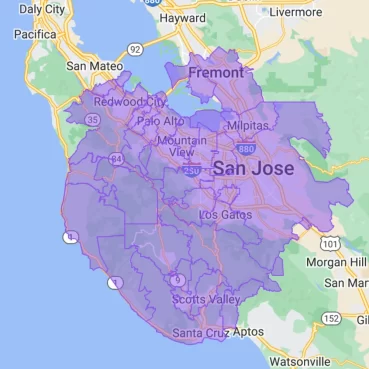
San Francisco, San Jose, Palo Alto, Mountain View, Sunnyvale, Santa Clara, Cupertino, Menlo Park, Redwood City, Fremont, Oakland, Berkeley, San Mateo, and the entire Silicon Valley.
Ready to Secure Your Property?
Request a service: https://guardyx.com/home/#contact